

 README

README

dingtalk
钉钉机器人消息封装——Golang
目前自定义机器人支持
使用
创建钉钉群机器人
- 选择添加
自定义机器人。 - 安全设置
共有关键词、加签、IP白名单三种设置,需要根据情况进行选择。

- 选择
自定义关键词,这里设置的关键词在初始化机器人的时候会用到。
获取
-
go get github.com/blinkbean/dingtalk
初始化
-
// key 创建钉钉机器人需要设置的关键词,默认为`.` func InitDingTalk(tokens []string, key string) *dingTalk // 加签方式创建钉钉机器人 // 加签机器人 access_token和secret一一对应,在创建机器人是获取 func InitDingTalkWithSecret(tokens string, secret string) *DingTalk -
import "github.com/blinkbean/dingtalk"

func main() {
    // 单个机器人有单位时间内消息条数的限制,如果有需要可以初始化多个token,发消息时随机发给其中一个机器人。
    var dingToken = []string{"7bd675b66646ba890046c2198257576470099e1bda0770bad7dd6684fb1e0415"}
    cli := dingtalk.InitDingTalk(dingToken, ".")
    cli.SendTextMessage("content")
}
OutGoing
-
钉钉OutGoing机器人原理
给钉钉机器人绑定一个HTTP类型的POST接口,通过@群机器人,将消息发送到指定外部服务,还可以将外部服务的响应结果返回到群组。
-
配置步骤
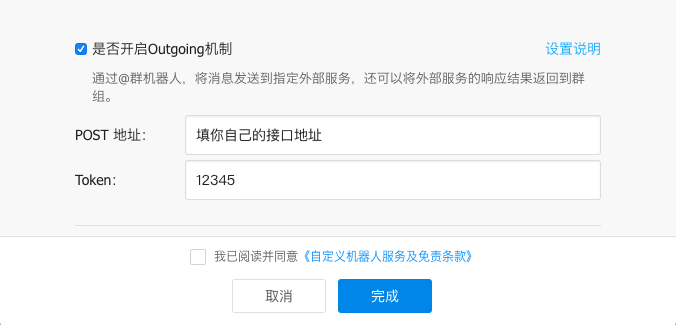
- 创建钉钉群机器人时选中
是否开启Outgoing机制。 - 配置POST地址,外网是可访问的接口地址,如:
http://robot.blinkbean.com/outgoing。 - 当前未做Token相关逻辑,填写内容不影响测试和使用。
-
钉钉发送的消息格式
{ "atUsers":[ { "dingtalkId":"$:LWCP_v1:$1h0bmSzcLCHncx0lCt3Bb/UVz7xv/8vh*" }], "chatbotUserId":"$:LWCP_v1:$1hbmLCHncx0lCt3Bb/UVz7x/8vh*", "conversationId":"cidkkCwvtlh1L0RmFuhmashi*==", "conversationTitle":"Blinkbean", "conversationType":"2", "createAt":1295212438950, "isAdmin":false, "isInAtList":true, "msgId":"msgm/bJkKjTupFM7ZoRF/eKR*==", "msgtype":"text", "sceneGroupCode":"project", "senderId":"$:LWCP_v1:$x4wFOct/DGctv96o4IxxB*==", "senderNick":"blinkbean", "sessionWebhook":"https://oapi.dingtalk.com/robot/sendBySession?session=6d69b333f243db32d42c11sda9de620*", "sessionWebhookExpiredTime":1595212438350, "text":{ "content":" hello" } } -
方法及可选参数
通过命令注册的方式,简化新命令增加操作,方便命令及其绑定方法的管理。
//接口方法 type ExecFunc func(args []string) []byte // 注册方法 func RegisterCommand(name string, execFunc ExecFunc, arity int, isAdmin bool) { cmdTable[name] = &command{ executor: execFunc, arity: arity, isAdmin: isAdmin, } } // Handler type OutGoingHandler struct{} -
使用
// 自定义方法 outgoingFunc := func(args []string) []byte { // do what you want to return NewTextMsg("hello").Marshaler() } // 自定义方法注册到handler RegisterCommand("hello", outgoingFunc, 2, true) // 启动http服务 http.Handle("/outgoing", &OutGoingHandler{}) _ = http.ListenAndServe(":8000", nil) -
本地测试
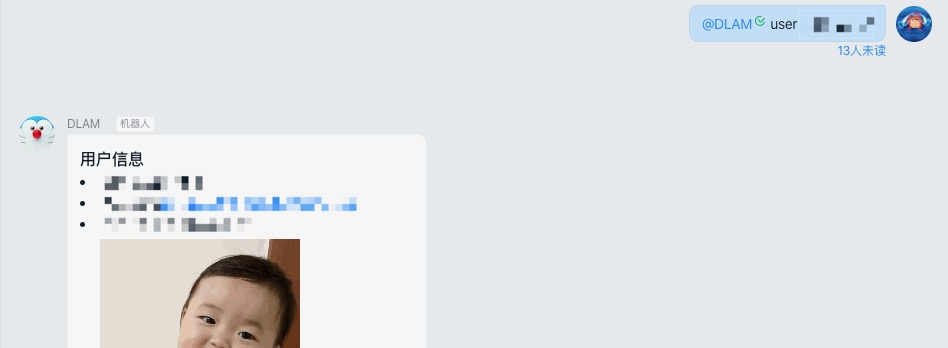
- 执行dingtalk_test.go TestOutGoing 方法启动http服务
- 执行以下curl命令(只保留了部分参数)
curl --location --request POST '127.0.0.1:8000/outgoing' \ --header 'Content-type: application/json' \ --data-raw ' { "isAdmin":true, "msgtype":"text", "text":{ "content":"hello" } }' - 获取返回结果
{
    "msgtype": "text",
    "text": {
        "content": "hello"
    },
    "at": {}
}
-
Text类型
- 方法及可选参数
// 方法定义 SendTextMessage(content string, opt ...atOption) error // 可选参数 // @所有人 WithAtAll() // @指定群成员 WithAtMobiles(mobiles []string) - 使用
// at所有人 cli.SendTextMessage("content", WithAtAll()) // at指定群成员 mobiles := []string{"131********"} cli.SendTextMessage("content", WithAtMobiles(mobiles)) 
Link类型
- 方法
// 方法定义 SendLinkMessage(title, text, picUrl, msgUrl string) error - 使用
cli.SendLinkMessage(title, text, picUrl, msgUrl) 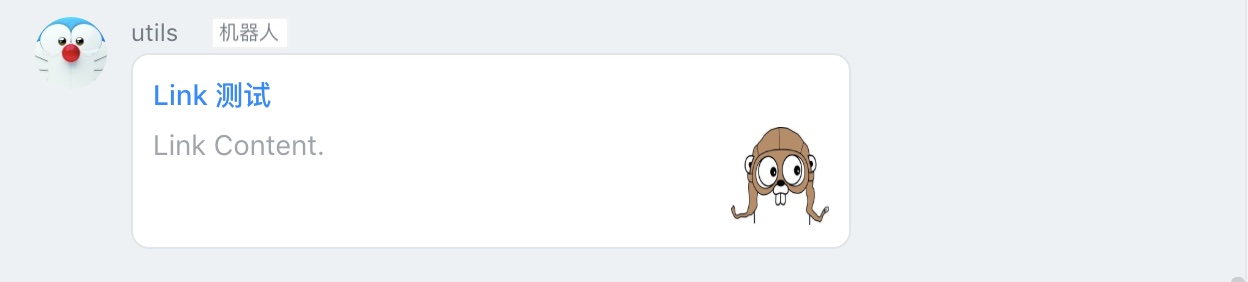
Markdown类型
-
方法及可选参数
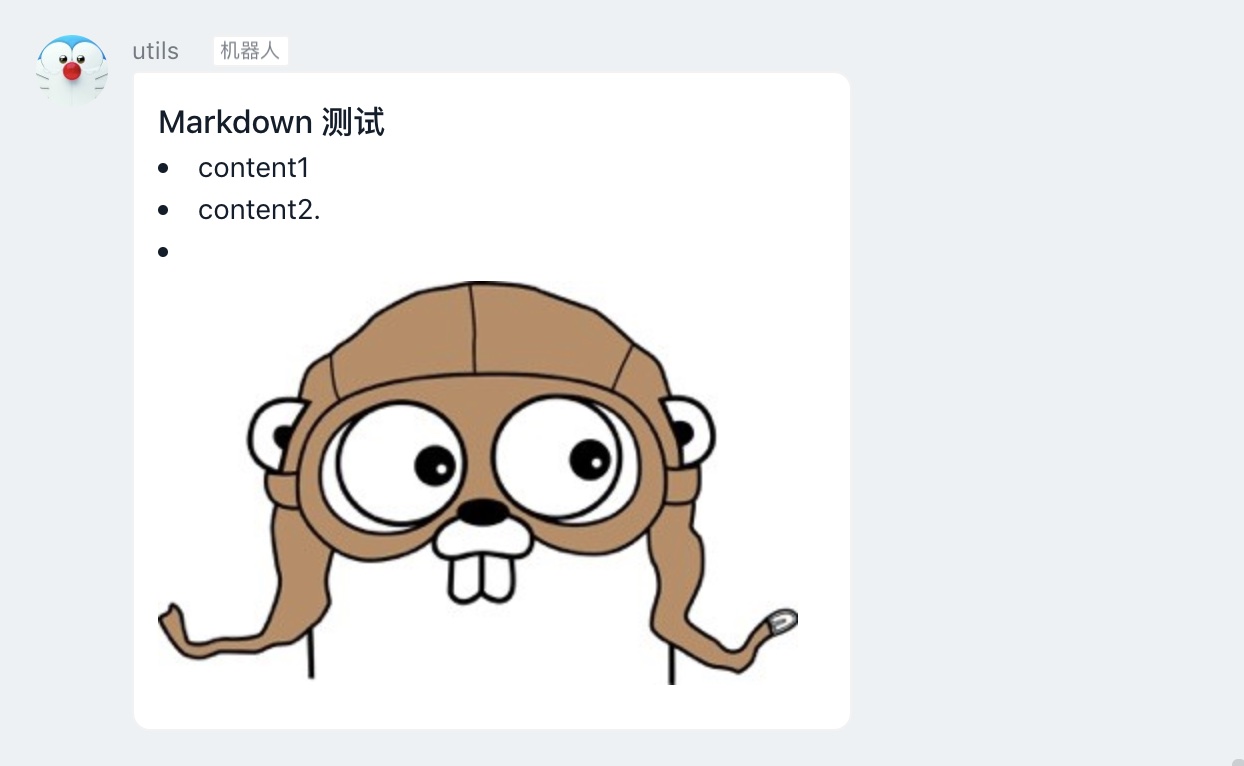
// 方法定义 // text:markdown格式字符串 SendMarkDownMessage(title, text string, opts ...atOption) error // 可选参数 目前钉钉markdown格式消息不支持@(可能是钉钉的bug),所以以下可选参数暂时不生效。 // @所有人 WithAtAll() // @指定群成员 WithAtMobiles(mobiles []string) -
使用
cli.SendMarkDownMessage(title, text) -
Markdown进阶
// 按行写入数组,增强markdown的可读性 msg := []string{ "### Link test", "---", "- <font color=#00ff00 size=6>红色文字</font>", "- content2", } cli.SendMarkDownMessageBySlice("Markdown title", msg, WithAtAll()) // 字体及颜色 dm := DingMap() dm.Set("颜色测试", H2) dm.Set("失败:$$ 同行不同色 $$", RED) // 双$分隔 dm.Set("---", N) dm.Set("金色", GOLD) dm.Set("成功", GREEN) dm.Set("警告", BLUE) dm.Set("普通文字", N) cli.SendMarkDownMessageBySlice("color test", dm.Slice()) -
-
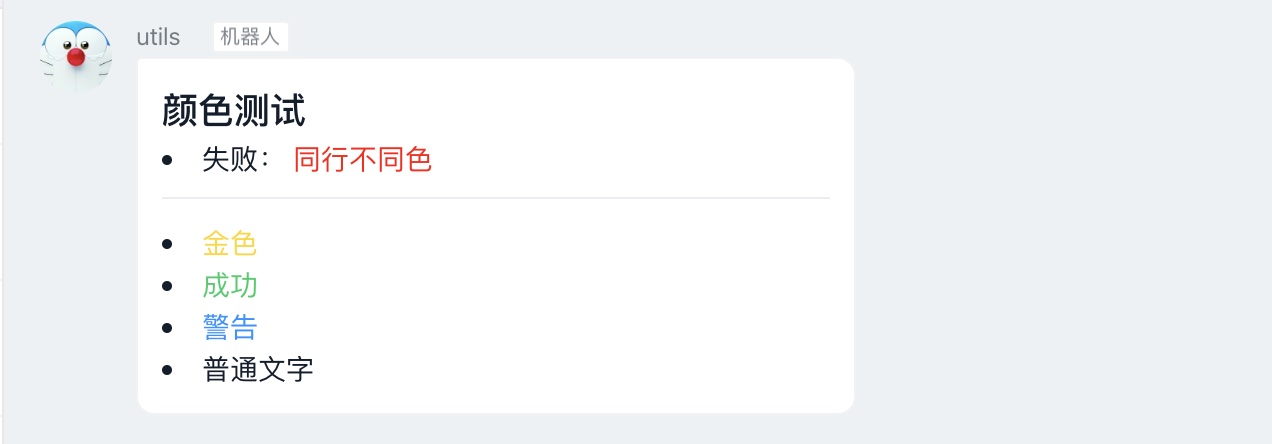
-
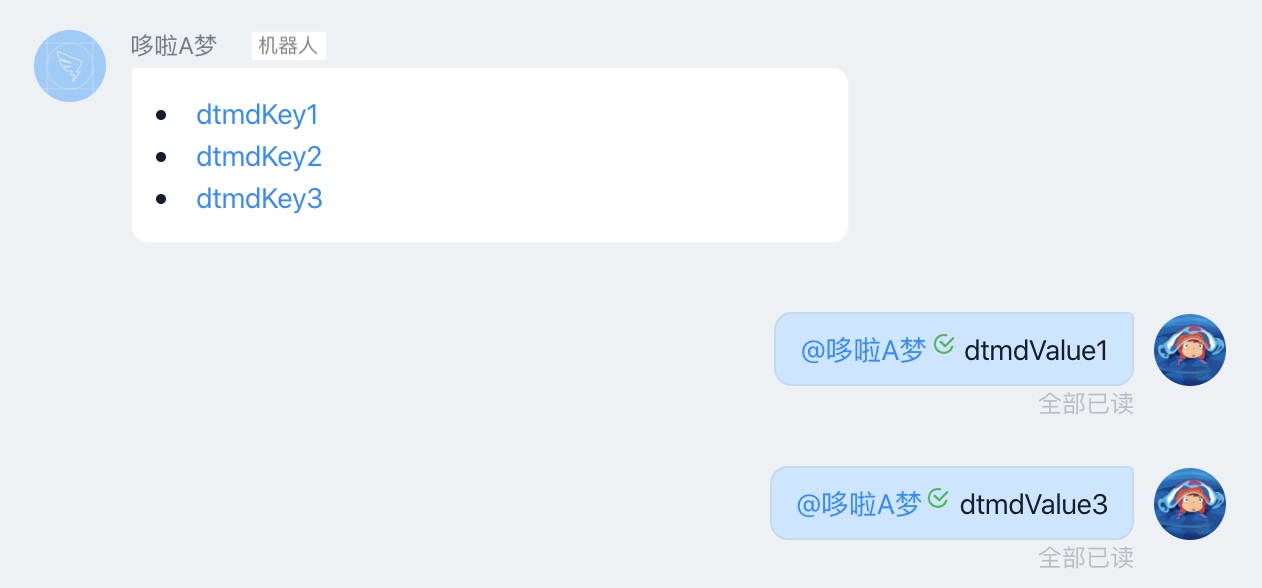
点击DTMD链接发送消息
点击'dtmdLink1',自动发送'dtmdValue1'并@机器人,简化输入
// 创建有序map dtmdOrderMap := DingMap(). Set("dtmdOrderMap1", "dtmdValue1"). Set("dtmdOrderMap2", "dtmdValue2"). Set("dtmdOrderMap3", "dtmdValue3") err := dingTalkCli.SendDTMDMessage("DTMD title", dtmdOrderMap) -
整体跳转ActionCard类型
- 方法及可选参数
// 方法定义 SendActionCardMessage(title, text string, opts ...actionCardOption) error // 可选参数 // 标题 WithCardSingleTitle(title string) // 跳转地址 WithCardSingleURL(url string) - 使用
cli.SendActionSingleMessage(title, text, WithCardSingleTitle(sTitle), WithCardSingleURL(url)) 
独立跳转ActionCard类型
- 方法及可选参数
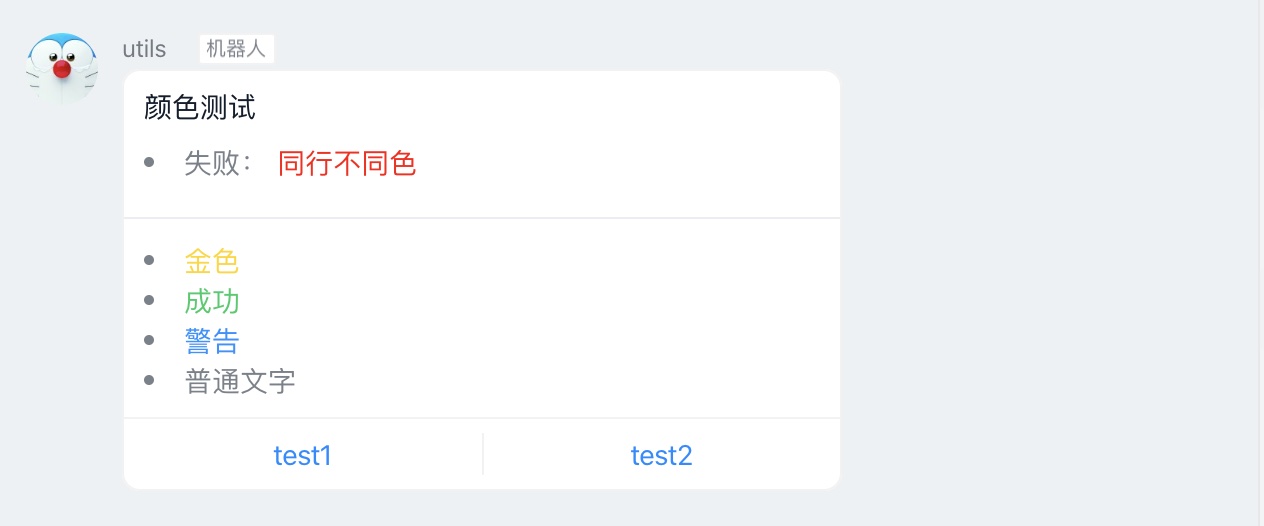
// 方法定义 SendActionCardMessage(title, text string, opts ...actionCardOption) error // 可选参数 // 按钮排列方向,默认水平 WithCardBtnVertical() // 跳转按钮 WithCardBtns(btns []ActionCardMultiBtnModel) // ActionCardMultiBtnModel type ActionCardMultiBtnModel struct { Title string `json:"title,omitempty"` ActionURL string `json:"actionURL,omitempty"` } - 使用
btns := []ActionCardMultiBtnModel{{ Title: "test1", ActionURL: testUrl, },{ Title: "test2", ActionURL: testUrl, }, } cli.SendActionSingleMessage(title, text, WithCardBtns(btns)) 
FeedCard类型
- 方法
// 方法定义 SendFeedCardMessage(feedCard []FeedCardLinkModel) error // FeedCardLinkModel type FeedCardLinkModel struct { Title string `json:"title,omitempty"` MessageURL string `json:"messageURL,omitempty"` PicURL string `json:"picURL,omitempty"` } - 使用
links := []FeedCardLinkModel{ { Title: "FeedCard1.", MessageURL: testUrl, PicURL: testImg, }, { Title: "FeedCard2", MessageURL: testUrl, PicURL: testImg, }, { Title: "FeedCard3", MessageURL: testUrl, PicURL: testImg, }, } cli.SendFeedCardMessage(links) 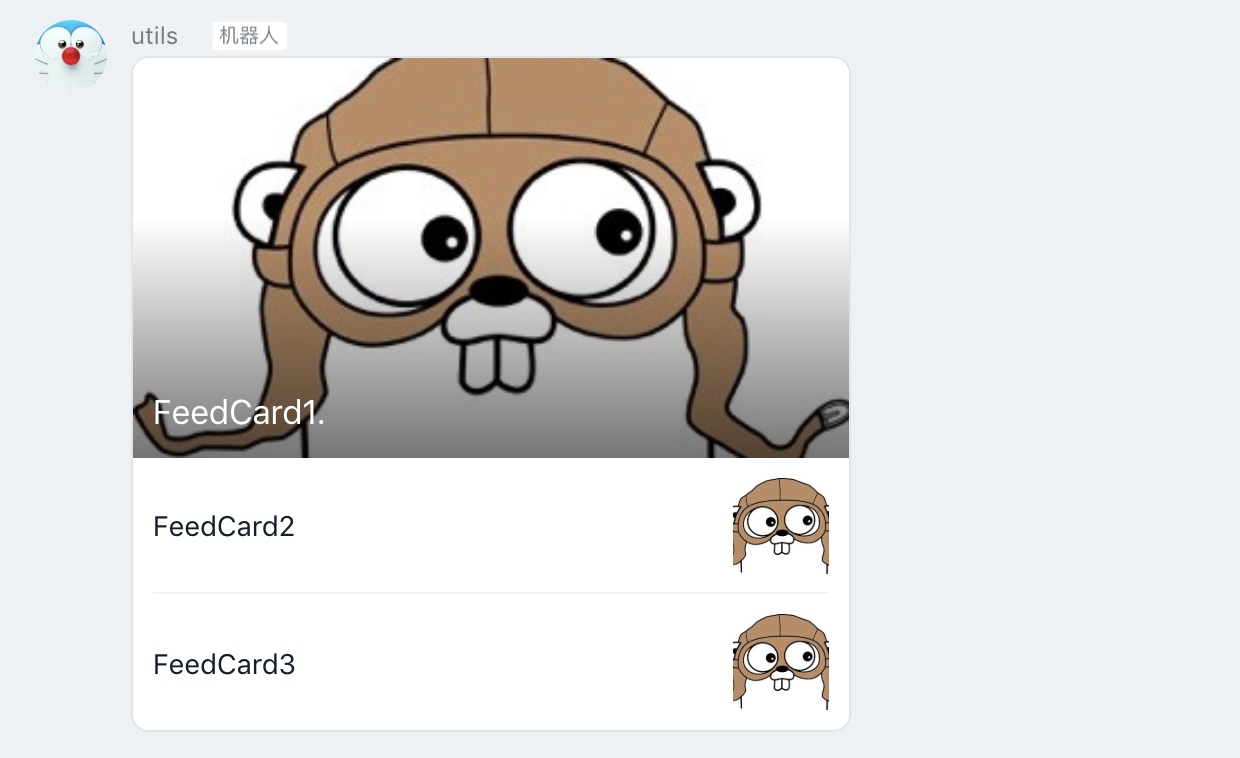
 Documentation

Documentation

Index 
- Constants
- func DingMap() *dingMap
- func NewActionCardMsg(title, text string, opts ...actionCardOption) *actionCardMsg
- func NewDTMDMsg(title string, dtmdMap *dingMap, opts ...atOption) *markDownMsg
- func NewFeedCardMsg(feedCard []FeedCardLinkModel) *feedCardMsg
- func NewLinkMsg(title, text, picUrl, msgUrl string) *linkMsg
- func NewMarkDownMsg(title string, text interface{}, opts ...atOption) *markDownMsg
- func NewTextMsg(content string, opts ...atOption) *textMsg
- func RegisterCommand(name string, execFunc ExecFunc, arity int, isAdmin bool)
- func WithAtAll() atOption
- func WithAtMobiles(mobiles []string) atOption
- func WithCardBtnVertical() actionCardOption
- func WithCardBtns(btns []ActionCardMultiBtnModel) actionCardOption
- func WithCardSingleTitle(title string) actionCardOption
- func WithCardSingleURL(url string) actionCardOption
- func WithInitSendTimeout(v time.Duration) initOption
- type ActionCardMultiBtnModel
- type DingTalk
- func (d *DingTalk) OutGoing(r io.Reader) (outGoingMsg outGoingModel, err error)
- func (d *DingTalk) SendActionCardMessage(title, text string, opts ...actionCardOption) error
- func (d *DingTalk) SendActionCardMessageBySlice(title string, textList []string, opts ...actionCardOption) error
- func (d *DingTalk) SendActionCardMessageBySliceWithCtx(ctx context.Context, title string, textList []string, opts ...actionCardOption) error
- func (d *DingTalk) SendActionCardMessageWithCtx(ctx context.Context, title, text string, opts ...actionCardOption) error
- func (d *DingTalk) SendDTMDMessage(title string, dtmdMap *dingMap, opt ...atOption) error
- func (d *DingTalk) SendDTMDMessageWithCtx(ctx context.Context, title string, dtmdMap *dingMap, opt ...atOption) error
- func (d *DingTalk) SendFeedCardMessage(feedCard []FeedCardLinkModel) error
- func (d *DingTalk) SendFeedCardMessageWithCtx(ctx context.Context, feedCard []FeedCardLinkModel) error
- func (d *DingTalk) SendLinkMessage(title, text, picUrl, msgUrl string) error
- func (d *DingTalk) SendLinkMessageWithCtx(ctx context.Context, title, text, picUrl, msgUrl string) error
- func (d *DingTalk) SendMarkDownMessage(title, text string, opts ...atOption) error
- func (d *DingTalk) SendMarkDownMessageBySlice(title string, textList []string, opts ...atOption) error
- func (d *DingTalk) SendMarkDownMessageBySliceWithCtx(ctx context.Context, title string, textList []string, opts ...atOption) error
- func (d *DingTalk) SendMarkDownMessageWithCtx(ctx context.Context, title, text string, opts ...atOption) error
- func (d *DingTalk) SendTextMessage(content string, opt ...atOption) error
- func (d *DingTalk) SendTextMessageWithCtx(ctx context.Context, content string, opt ...atOption) error
- type ExecFunc
- type FeedCardLinkModel
- type MarkType
- type OutGoingHandler
Constants 
View Source
const (
	TEXT        msgTypeType = "text"
	LINK        msgTypeType = "link"
	MARKDOWN    msgTypeType = "markdown"
	ACTION_CARD msgTypeType = "actionCard"
	FEED_CARD   msgTypeType = "feedCard"
)
Variables 
This section is empty.
Functions 
func DingMap 
func DingMap() *dingMap
func NewActionCardMsg 
func NewActionCardMsg(title, text string, opts ...actionCardOption) *actionCardMsg
func NewFeedCardMsg 
func NewFeedCardMsg(feedCard []FeedCardLinkModel) *feedCardMsg
func NewMarkDownMsg 
func NewMarkDownMsg(title string, text interface{}, opts ...atOption) *markDownMsg
func RegisterCommand 
func WithAtAll 
func WithAtAll() atOption
func WithCardBtnVertical 
func WithCardBtnVertical() actionCardOption
func WithCardBtns 
func WithCardBtns(btns []ActionCardMultiBtnModel) actionCardOption
Types 
type ActionCardMultiBtnModel 
type DingTalk 
type DingTalk struct {
	InitModel initModel
	// contains filtered or unexported fields
}
func InitDingTalkWithSecret 
func (*DingTalk) OutGoing 
func (*DingTalk) SendActionCardMessage 
func (*DingTalk) SendActionCardMessageBySlice 
func (*DingTalk) SendActionCardMessageBySliceWithCtx 
func (*DingTalk) SendActionCardMessageWithCtx 
func (*DingTalk) SendDTMDMessage 
SendDTMDMessage 利用dtmd发送点击消息
func (*DingTalk) SendDTMDMessageWithCtx 
func (d *DingTalk) SendDTMDMessageWithCtx(ctx context.Context, title string, dtmdMap *dingMap, opt ...atOption) error
SendDTMDMessageWithCtx 利用dtmd发送点击消息
func (*DingTalk) SendFeedCardMessage 
func (d *DingTalk) SendFeedCardMessage(feedCard []FeedCardLinkModel) error
func (*DingTalk) SendFeedCardMessageWithCtx 
func (d *DingTalk) SendFeedCardMessageWithCtx(ctx context.Context, feedCard []FeedCardLinkModel) error
func (*DingTalk) SendLinkMessage 
func (*DingTalk) SendLinkMessageWithCtx 
func (*DingTalk) SendMarkDownMessage 
func (*DingTalk) SendMarkDownMessageBySlice 
func (*DingTalk) SendMarkDownMessageBySliceWithCtx 
func (*DingTalk) SendMarkDownMessageWithCtx 
func (*DingTalk) SendTextMessage 
type FeedCardLinkModel 
type OutGoingHandler 
type OutGoingHandler struct{}
func (*OutGoingHandler) ServeHTTP 
func (h *OutGoingHandler) ServeHTTP(w http.ResponseWriter, r *http.Request)
 Source Files

Source Files

- base.go
- consts.go
- dohttp.go
- model.go
- router.go
- webhook.go
- webhook_withctx.go
Click to show internal directories.
Click to hide internal directories.